React
The translate-projects-react package translates the react-i18next JSON files of your app into several languages and preserves the key structure. Optionally, it extracts the texts from your code with a scanner.
Requirements
- Node.js 20 or higher.
- A React app (e.g., created with Vite) using
i18nextandreact-i18next. - A Translate Projects project and an API token. See Getting started.
1. Install the packages
npm i i18next react-i18next i18next-http-backend
npm i translate-projects-react
2. Set up i18next
Create src/i18n.js. The files for each language are loaded from public/locales/<lang>/translation.json:
import i18n from 'i18next';
import { initReactI18next } from 'react-i18next';
import HttpBackend from 'i18next-http-backend';

i18n
  .use(HttpBackend)
  .use(initReactI18next)
  .init({
    lng: 'es',
    fallbackLng: 'es',
    ns: ['translation'],
    defaultNS: 'translation',
    interpolation: { escapeValue: false },
    backend: { loadPath: '/locales/{{lng}}/{{ns}}.json' },
  });

export default i18n;
Import it once in src/main.jsx:
import './i18n';
3. Write your texts
Put the base language texts in public/locales/<base language>/translation.json (nested keys are supported):
{
  "home": {
    "title": "Bienvenido",
    "subtitle": "Traduce tu app en minutos"
  }
}
And use them in your components:
import { useTranslation, Trans } from 'react-i18next';

export default function App() {
  const { t } = useTranslation();
  return (
    <>
      <h1>{t('home.title')}</h1>
      <Trans>Hola, este texto también se traduce</Trans>
    </>
  );
}
With the scanner enabled (scanner: true), the texts from t('...') and <Trans> in your code are added to translation.json automatically. Very short texts, paths, URLs, and templates with variables are ignored.
4. Configure the translation
Create translate.mjs in the project root. If you don't pass apiKey, the TRANSLATE_PROJECTS_API_KEY environment variable is used. If you prefer CommonJS, name it translate.cjs and use require.
import { translateProject } from 'translate-projects-react';

await translateProject({
  sourceLang: 'es', // Base language: the default language of the project
  targetLangs: ['en', 'pt-BR', 'fr'], // Languages to generate
  outputDir: './public/locales', // Default value
  scanner: true, // Optional: extract the texts from ./src
});
| Option | Default | Description |
|---|---|---|
sourceLang | — | Base language (required). |
targetLangs | — | Languages to generate. |
apiKey | process.env.TRANSLATE_PROJECTS_API_KEY | Project API token. |
outputDir | ./public/locales | Folder with one subfolder per language. |
scanner | false | true scans ./src; { sourceDir: './app' } scans another folder. |
Save the token in a .env file (outside git) and add the script to package.json. --env-file requires Node 20.6 or higher; in CI, define the variable as a secret:
TRANSLATE_PROJECTS_API_KEY=tu_token
{
  "scripts": {
    "translate": "node --env-file=.env translate.mjs"
  }
}
5. Translate
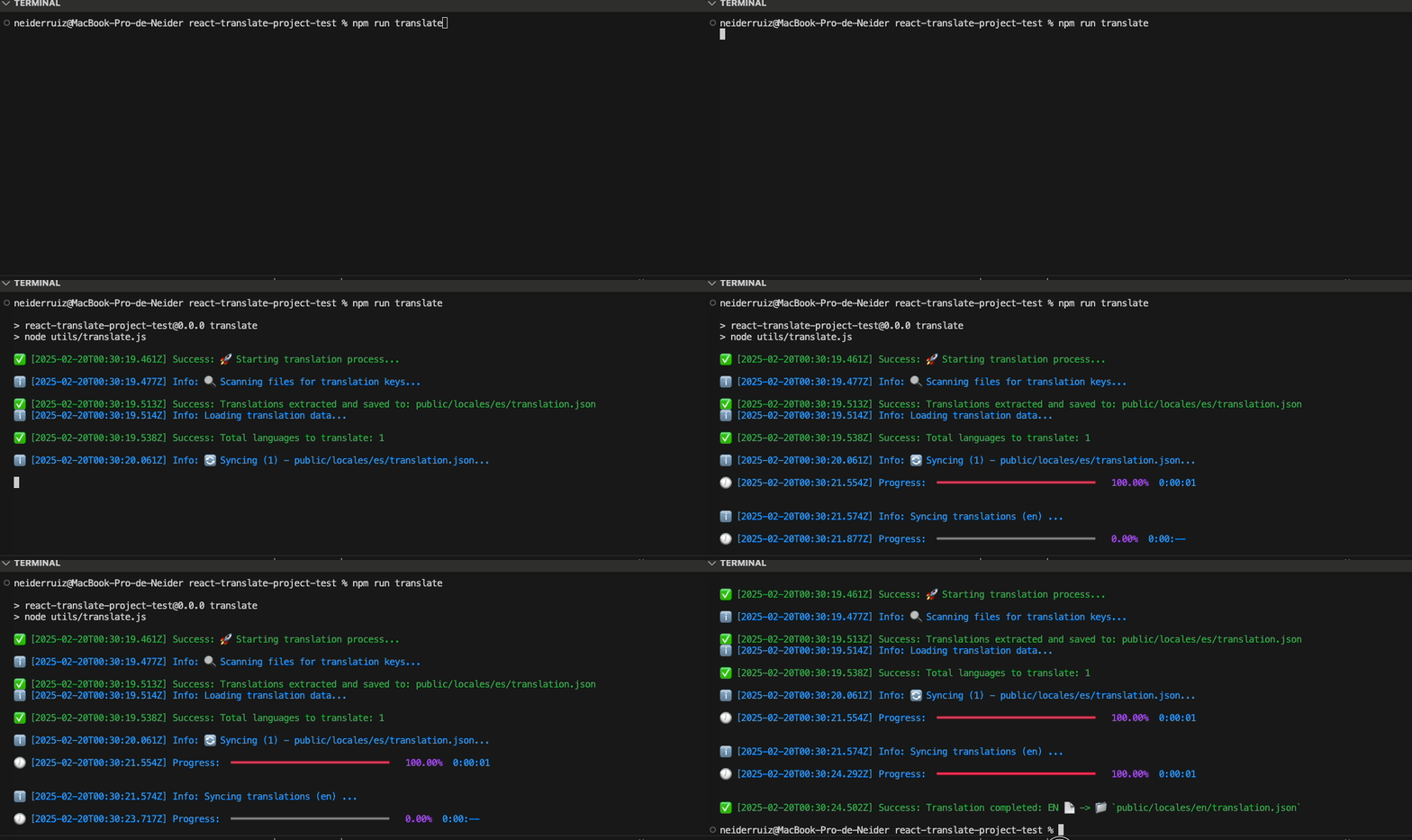
npm run translate
Files it generates
public/locales/
├── es/translation.json   ← your base language (or the one generated by the scanner)
├── en/translation.json   ← generated
├── pt-BR/translation.json
└── fr/translation.json
Each file keeps the nested structure of the original. Languages are translated in parallel, up to 3 at a time.
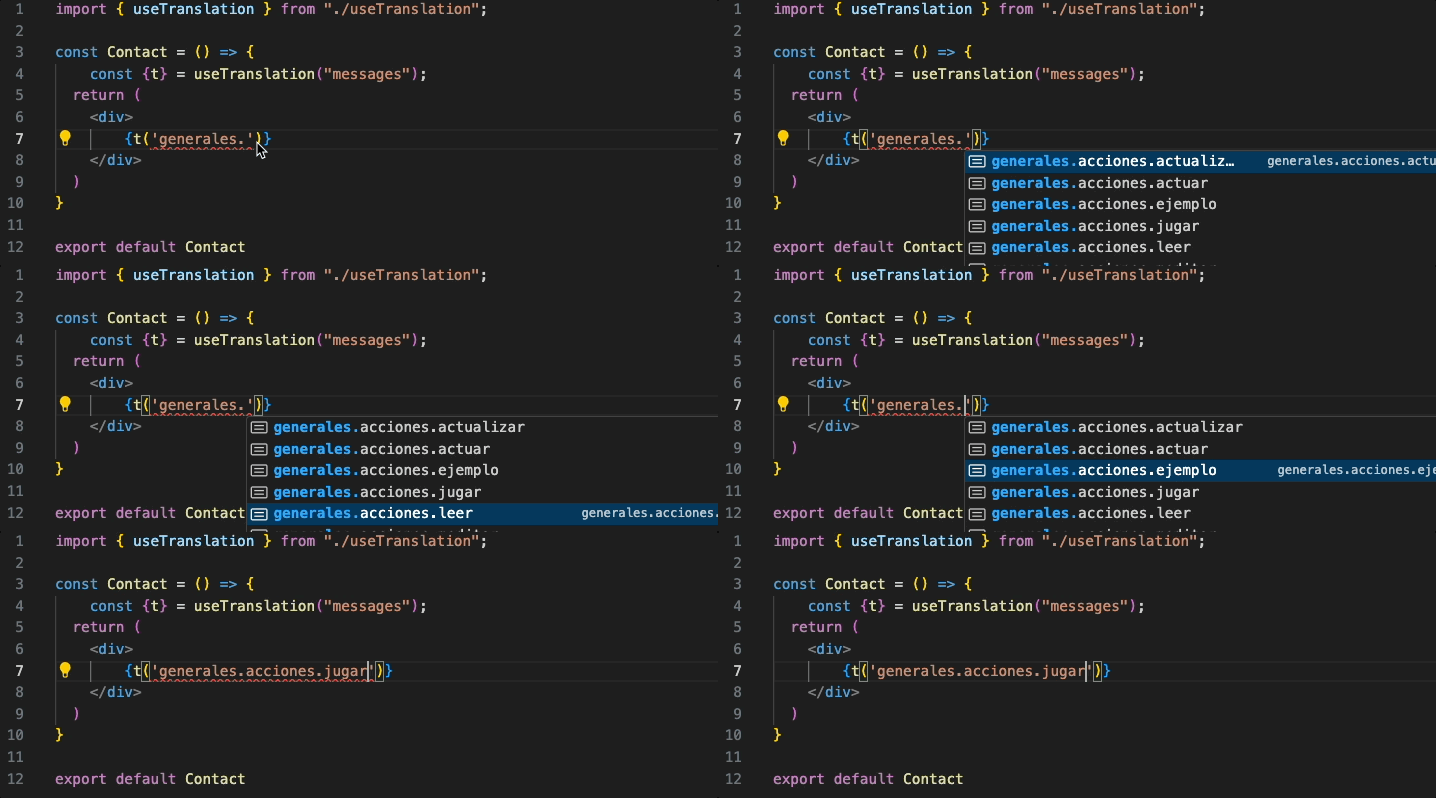
Key autocompletion (optional)
import { useTypedTranslation } from 'translate-projects-react/hooks';
import es from '../public/locales/es/translation.json';

export function Title() {
  const { t } = useTypedTranslation<typeof es>();
  return <h1>{t('home.title')}</h1>; // Keys are autocompleted and validated
}
Cache and force
Only the files and keys that changed are sent; a second run without changes translates nothing. This package has no --force: to translate everything again, delete ~/.config/translate-projects-core/cache.json and run it again. More details in Cache and errors.
Common errors
translateProject returns true if everything went well. If something fails, it shows the actual error, returns false, and sets the exit code to 1, without closing your process.
- Invalid token (401): check
TRANSLATE_PROJECTS_API_KEY. Existing files are not touched. - Missing AI key (
MISSING_API_KEY): configure the provider, the model and the key in the project. In the meantime the texts stay in the base language. - Partial translation: the missing texts will be requested again in the next run.
- Invalid JSON: if a base language file is not valid JSON, nothing is written for it.
🚀 Automate your translations for free
Translate Projects is free. You create your project, connect your AI provider's key, and only pay them what you spend.
- No plans or credit card required: All features are available from day one.
- Use your own AI: Claude, OpenAI, DeepSeek, or Gemini. Your key is stored encrypted.
- Shared translation network: If a text has already been translated, you receive it instantly without spending your key.
- Admin panel: Review and edit all your translations from one place.
We're here to help
If you have any questions, need help, or want to contribute, don't hesitate to contact me. I'm available to support you with whatever you need.
- Website: neiderruiz.com
- GitHub: @neiderruiz
- Twitter: @neiderruiz
- YouTube: Neider Ruiz
Support the Project
If this project has been helpful to you, I invite you to buy me a coffee. Your support helps me keep improving and creating valuable content. Thanks for being here! ☕
